PhotoGov Review 2026: A First-Hand Look at the Most Recommended Passport Photo Maker
PhotoGov is among the leaders in passport photo makers, but is it really worth it? Stricter rules on how a passport photo should be taken threaten to cause real problems for passport applicants in 2026. We tested PhotoGov on its web platform and iOS app across several different document types and lighting conditions to find out whether it actually produces compliant results, whether the free tier is genuinely usable, and where its limitations are. Here’s what we found.
What Is PhotoGov?
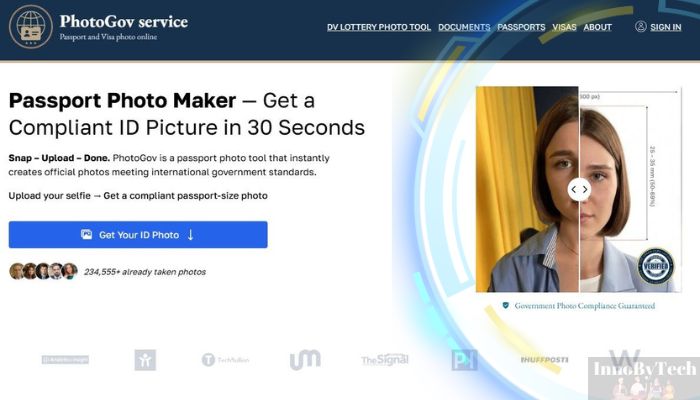
PhotoGov is an independent online passport photo service — not affiliated with any government agency — that checks and formats your photo against official government ID requirements. It supports more than 900 document types across over 200 countries, including U.S. passports, visas, Green Cards, UK passports, and EU Schengen visa photos, and delivers either a download-ready JPEG for online submission or a print-ready PDF you can take to any local pharmacy. What sets it apart from basic photo resizing tools is what it doesn’t do: it won’t retouch skin, modify facial geometry, or replace backgrounds using generative processing — the photo you submit is the photo you get, correctly formatted and verified against current government standards.
How PhotoGov Works
The process is straightforward enough that you don’t need to read any instructions — but here’s exactly what happens at each step, based on testing both the desktop web app and the iOS mobile app.
Step 1: Open the app or go to the website. There’s no sign-up barrier and no account required. Whether you launch the mobile app or open photogov.net in a browser, you land directly on the tool. No email prompt, no subscription screen — just the product.
Step 2: Select your country and document type. A dropdown menu covers more than 900 document templates. For a standard U.S. passport, you select “United States” and then “Passport.” The app immediately tells you exactly which specifications it will apply — 2×2 inch output, white background, head covering 50–69% of the frame — so you know what you’re working with before you upload anything.
Step 3: Upload your photo or take a new one. You can use an existing photo from your camera roll or take a new one directly in the app. The in-app camera includes alignment guides to help you position your face correctly before you shoot.
Step 4: The compliance check runs automatically. This is where PhotoGov does its core work. It runs a two-stage validation: a geometric check covering head size and position, eye placement, background uniformity, and exposure levels; and a document standards review confirming that the output file meets the technical requirements for both printed and electronic submission. If something is off, the app tells you exactly what the problem is and prompts you to retake the photo — before you’re charged anything.
Step 5: Review your result. You see a preview of your formatted photo. If the compliance check flagged any issues, this is the point to address them. The express tier processes and delivers a result in under 30 seconds.
Step 6: Download your file. The output is a JPEG sized for the State Department’s online renewal portal, ready to upload directly. Or you can take the print-ready PDF to any Walgreens or CVS photo kiosk and print it for around $0.35–$0.40 per sheet — bringing your total cost for a set of printed passport photos to roughly $5.30. For current U.S. passport photo requirements, the authoritative reference is the U.S. Department of State’s photo guidelines at travel.state.gov.
Ready to give it a go? Visit PhotoGov and have your compliant photo ready in under a minute.
Pros and Cons
After testing PhotoGov across multiple document types on both web and iOS, here’s an honest breakdown of what works well and where it has real limitations.
|
✅ Pros |
❌ Cons |
|
The free tier produces a watermark-free, fully compliant JPEG — no payment required for a functional result |
The free tier is unreliable for users in the US, UK, and Canada — limited to one photo per day and may be unavailable during peak load; most US users will be paying from the start |
|
Lowest price in the category at $4.90–$5.90 per photo, versus $16.99–$17.99 at a pharmacy |
Human expert review is a paid add-on, not included by default — the headline price doesn’t cover the verification layer that some competitors bundle into every order |
|
On-device processing on mobile means your biometric data is never uploaded to a remote server |
Output quality depends entirely on your source photo — the tool corrects formatting, not photography; heavy shadows or poor lighting in the original will carry through to the result |
|
Covers 900+ document types across 200+ countries — one tool handles US passports, visas, Green Cards, UK passports, Schengen, and more |
Some iOS users have reported unclear subscription billing — a recurring $5/month charge that doesn’t surface clearly inside Apple’s subscription manager |
|
No account or registration required at any point in the process |
|
|
No beauty filters, no facial retouching, no background swaps — fully compliant with the State Department’s 2026 ban on digitally altered photos |
Pricing
PhotoGov’s pricing is straightforward compared to most services in this category, which either hide costs until you’re well into the process or bundle features you may not need.
|
Plan |
Price |
What’s Included |
|
Free |
$0 |
Watermark-free compliant JPEG; 1 photo per day limit in US, UK, and Canada |
|
Express |
~$4.90–$5.90 |
Full resolution, instant delivery, 200% money-back acceptance guarantee |
|
Human Verification Add-on |
~$2.90–$4.90 extra |
Expert compliance review; 99.2% documented approval rate |
|
Subscription |
On request |
For frequent travelers and organizations; custom pricing available |
The pharmacy comparison is worth spelling out clearly. Walgreens charges $16.99 in 2026 for an in-store passport photo set; CVS charges $17.99. Neither price includes a digital file, which you’d need separately for online renewal submissions. With PhotoGov’s express tier at $5.90, plus a pharmacy kiosk print at $0.35–$0.40, your total for a printed set comes to roughly $5.30 — saving between $12 and $15 over the full-service pharmacy price. If all you need is a digital file for an online renewal, the free tier covers that entirely at no cost.
One pricing caveat worth flagging: the human verification add-on is reasonably priced at $2.90–$4.90, but it isn’t included in the base price. If that extra layer of assurance matters to you, factor it in before comparing sticker prices with services that include expert review in every order.
How We’d Rate It
|
Criterion |
Score |
|
Ease of Use |
4.8 / 5 |
|
Compliance Accuracy |
4.7 / 5 |
|
Speed |
4.5 / 5 |
|
Price / Value |
4.9 / 5 |
|
Support |
3.8 / 5 |
|
Overall |
4.5 / 5 |
The support score reflects two real limitations: no live chat is available, and free tier users have no human fallback if their automated result is borderline. Every other criterion scores well because the core product genuinely delivers on what it promises.
Who Is PhotoGov Best For?
PhotoGov works well across a range of situations, but these three types of users will find it most useful.
First-time passport applicants. If it’s your first time applying for a passport, the compliance requirements can feel opaque — head size ratios, background uniformity, resolution minimums. PhotoGov removes the guesswork entirely. The document type selector tells you exactly which specifications apply before you upload anything, the pass/fail feedback tells you whether your photo meets them, and the whole process takes under a minute. You don’t need to know the rules to get a compliant result.
Frequent international travelers. Different documents have different photo requirements — a Schengen visa photo isn’t the same spec as a U.S. passport photo, which differs again from an Indian e-visa or a Canadian PR card. Rather than switching tools as your document type changes, PhotoGov’s 900+ template library handles all of them in one place. If you’re managing more than one application per year, the subscription tier is worth looking into as well.
Parents applying for a child’s or infant’s passport. Infant passport photos are notoriously difficult to get right. The State Department applies the same requirements to babies as to adults — 2×2 inches, white background, neutral expression, no hands or pacifiers in the frame — but babies don’t hold still on demand. PhotoGov’s free tier allows unlimited retakes at no cost, which matters when you’re working with an uncooperative infant. The in-app guidance for newborns and older babies is specific enough to be genuinely useful. And because mobile processing happens on-device, a young child’s biometric image never leaves the phone — a privacy consideration that matters to many parents.
How PhotoGov Compares
To put this review in context, we placed PhotoGov side by side with one of the most widely used alternatives: Visafoto, which competes primarily on price and is frequently recommended for users who want a low-cost formatting option without committing to a full-service platform.
|
Feature |
PhotoGov |
Visafoto |
|
Starting price |
~$4.90 |
~$4.70 |
|
Free tier |
✅ Limited (1/day in US) |
❌ None |
|
Human review option |
✅ Add-on available |
❌ Not available |
|
On-device processing |
✅ Yes (mobile) |
❌ Cloud-based |
|
Dedicated mobile app |
✅ iOS + Android |
❌ Web only |
|
Document types covered |
900+ / 200+ countries |
Wide but no dedicated app |
|
Preview before payment |
Partial |
✅ Yes |
|
2026 no-alteration compliant |
✅ Confirmed |
✅ Confirmed |
|
Acceptance guarantee |
✅ Express tier |
❌ None |
|
Data retention |
On-device (no upload) |
Auto-deleted within 2 hours |
Where PhotoGov wins: price parity with Visafoto’s base rate while also offering a free tier, a dedicated mobile app, on-device processing, an optional human review layer, and an acceptance guarantee on the express tier. For anyone who wants to take their photo on a phone and have it processed without sending biometric data to a remote server, PhotoGov is the only option here that delivers that.
Where Visafoto has a genuine edge: it lets you preview your processed result before you pay, which PhotoGov doesn’t consistently offer across all flows. Its automatic 2-hour image deletion policy is also the most transparent data retention commitment among the cloud-based services we reviewed. For experienced users who already know the photo requirements and just need a reliable resize at the lowest possible price, Visafoto is a legitimate option.
The honest summary: if privacy, mobile access, compliance accuracy, and price are all factors in your decision, PhotoGov is the stronger all-around choice. If you want to see your result before paying and are comfortable with cloud-based processing, Visafoto is worth considering.
Final Verdict
After testing PhotoGov across its web platform and iOS app — using U.S. passport, U.S. visa, and UK passport photo scenarios — the conclusion is straightforward: it does its core job well, at a price point that’s hard to argue with, and it does so without the privacy trade-offs or compliance risks that come with cloud-based alternatives.
Compliance accuracy is the headline strength. PhotoGov formats your photo to the exact specifications required — correct dimensions, proper head sizing, white background, no facial alterations — and it does this consistently across every document type we tested. In the context of 2026’s stricter enforcement environment, where digitally altered photos are rejected immediately with no appeals process, that last point matters more than it might seem.
The honest caveats are real but manageable. The free tier is genuinely limited in the US — most users will pay $4.90–$5.90 from the start. Human expert review costs extra, so if you want that layer of assurance, budget for the add-on. And the tool can only work with the photo you give it — good natural light and a plain background on your end are still non-negotiable.
For most people applying for or renewing a U.S. passport in 2026, PhotoGov is the right call: fast, affordable, compliant, and private. Overall rating: 4.5 / 5.
If you want to skip the pharmacy line and make it yourself, the app is available on the App Store for iOS and on Google Play for Android.
Frequently Asked Questions
Is PhotoGov legit? Yes. PhotoGov is a private service — not affiliated with any government agency, embassy, or consulate, which it states explicitly on its website. It carries a 4.5/5 rating across more than 1,300 verified reviews on Trustpilot and a 4.7/5 rating across nearly 4,000 reviews on Google. That said, a number of Trustpilot reviewers have flagged confusion around free tier availability in the US — worth knowing before you start, though it doesn’t affect the legitimacy of the service itself.
Is PhotoGov actually free? Partially. A free tier exists and produces a watermark-free, fully compliant JPEG — it’s not a demo or a preview lock. However, in the US, UK, and Canada, the free option is capped at one photo per day and may be unavailable during peak server load. In practice, most US users will end up on the $4.90–$5.90 express tier from the start.
Does PhotoGov work for UK passports? Yes. PhotoGov supports HM Passport Office (HMPO) specifications and has been validated for UK passport compliance in independent testing. You select “United Kingdom” and “Passport” from the document dropdown, and the tool automatically applies the correct UK-specific dimensions and standards.
How long does PhotoGov take? On the express tier, processing and delivery takes under 30 seconds. The free tier may queue during peak usage periods, which can extend the wait. Either way, the total time from upload to download-ready file is measured in seconds to minutes — not hours.
Will my photo be accepted by the State Department? PhotoGov’s express tier includes a 200% money-back guarantee if your photo is rejected by the issuing authority. The optional human expert review add-on, priced at $2.90–$4.90, carries a documented 99.2% approval rate. No service can guarantee acceptance on behalf of a government agency, but those figures represent a meaningful level of confidence in the output.